
Using Verification, Decisioning, and Monitoring
Verification
Business Verification APIs are used to retrieve and enrich KYB information. The verification process begins with a call to the Advanced Match or Search API to retrieve to retrieve one or more markaazId values. The verification APIs provide data for firmographics, business health, compliance, company hierarchy and diversity. Markaaz also provides person-to-business name matching to allow verification of a specific name as an officer or primary contact for the business.
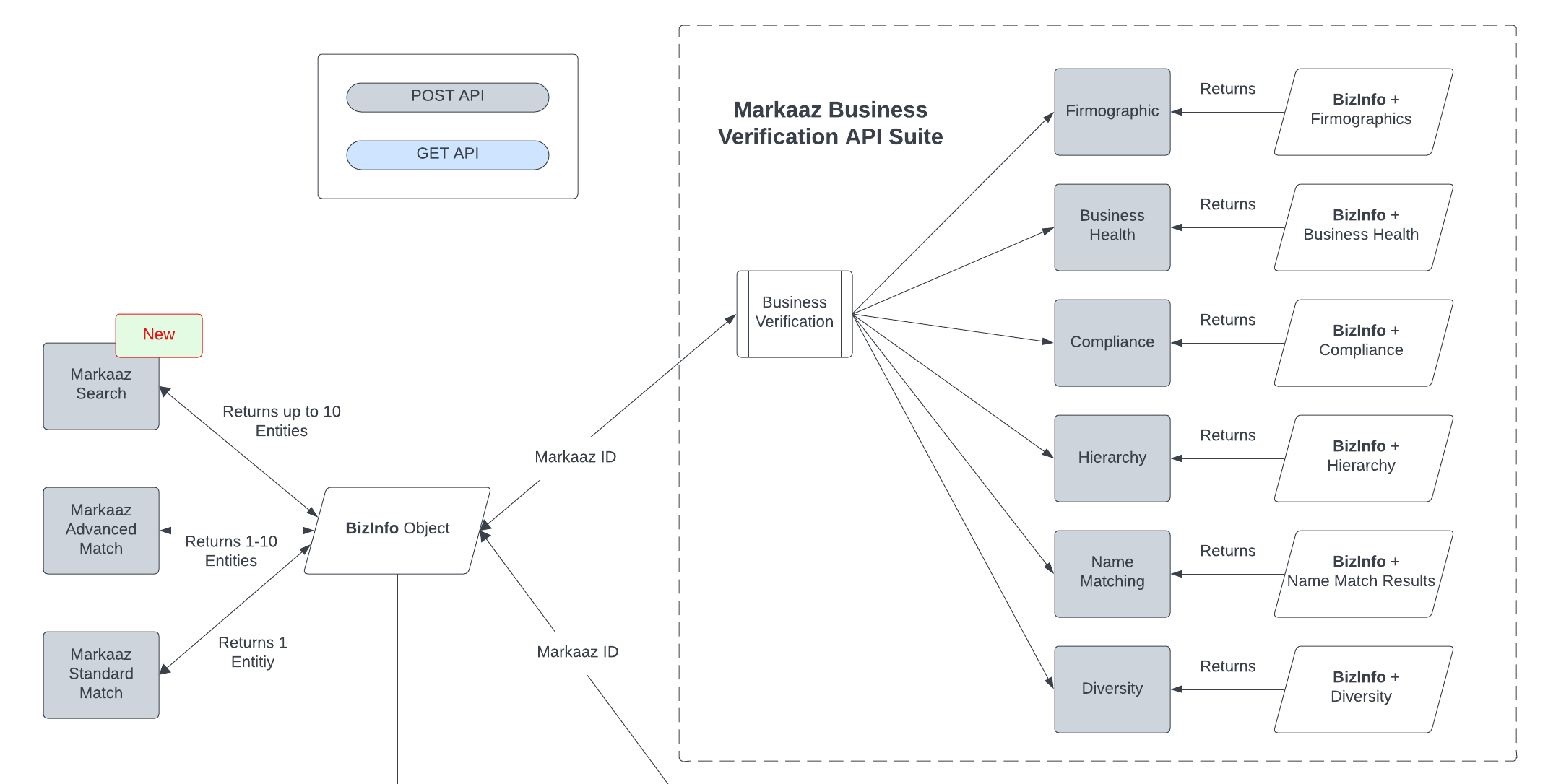
Verification Responses
- Each Verification API response includes the
bizInfoobject, as seen in the Advanced Match and Search responses above. - Each Verification API response includes additional data objects and arrays unique to that API. Response details and examples of Verification APIs can be found on the Markaaz Developer Portal.
You may notice that sometimes field values contain the empty string "" and at other times the same fields may be null. This is in part, because we will always respond with all of the objects that you would see if the response payload were 100% populated. If we don't have any data for an object, like primaryContact for example, the fields values will be null. If there is one field populated in primaryContact, then the fields with no data available will be the empty string, "". There are some exceptions to this as with numerical values where zero is valid. For those fields we return null when the value is unknown and zero (0) where it is known and that is the value we have for the record.
Decisioning
This API utilizes a set of decision parameters set for each partner. The parameters are configurable at the partner level from within the Markaaz Enterprise Partner Portal (EPP).
The decisioning parameters are used to evaluate a business entity based on values specified by the business. For example, if you wish to automate decisions to exclude businesses having an annual sales volume less than $10,000 then that value would be used as a limiting factor and the API would return a decision summary of No (not approved). In addition to the decision summary you can also retrieve the detail data for each data point.

Important Note:If a specific data field comes back as a null value from the Directory, the decision for that parameter will pass decisioning with the message that a null value cannot be evaluated. We do not fail a business because the data is unavailable. If your business rule wishes to fail decisioning when data is not available, the decision details API provides enough information to allow an "override" as an implementation decision. As a developer, you will need to check the actual value of the decision parameter(s), checking for null, and code accordingly if you choose to fail on null values.
Monitoring and Portfolios
A business entity may be monitored for both business and compliance data changes. A client may choose to monitor for compliance updates only or business updates only through the different settings of their portfolios. Business monitoring is reported monthly while compliance monitoring is reported daily. You must retrieve the markaazId to be monitored using Advanced Match or Search, then add that entity to a portfolio before using Monitoring APIs. Markaaz makes monitoring reports available via download in the Enterprise Partner Portal (EPP). The download will include both a JSON of updated golden records for ingestion and a PDF summary of how many businesses we captured changes for.
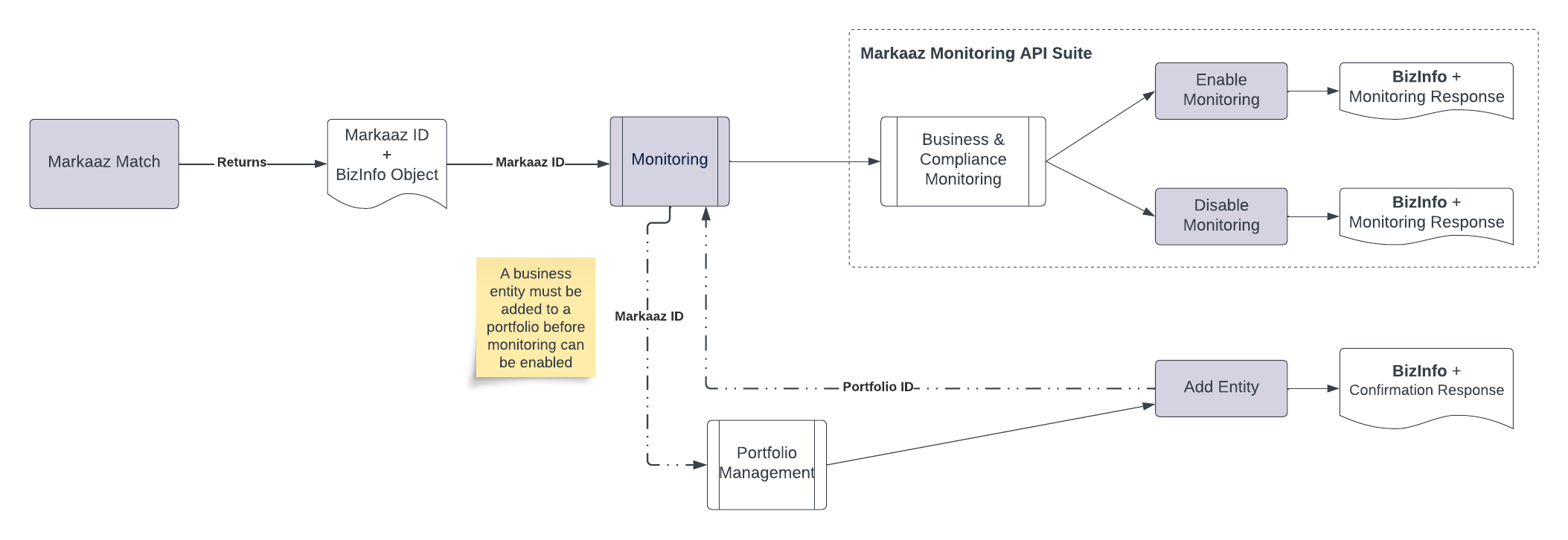
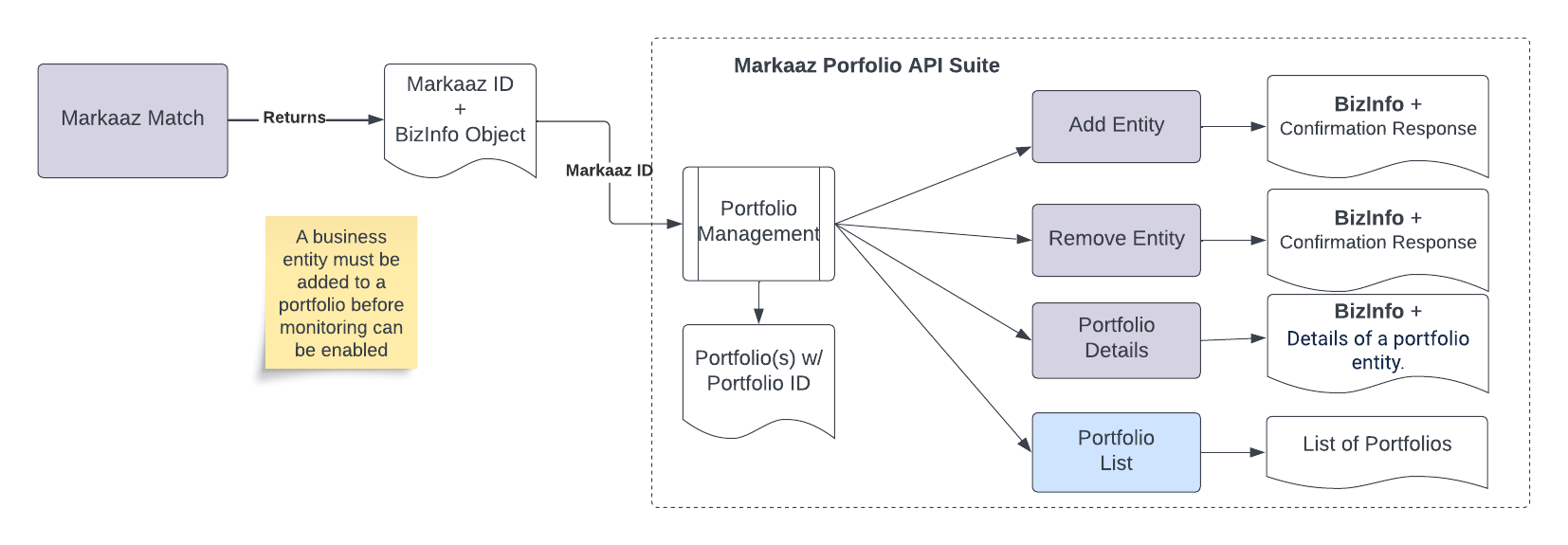
There are four Portfolio APIs available. Each Markaaz client is created with a default portfolio and additional portfolios can be created upon request. You can discover the list of portfolios using the Portfolio List API to get the portfolio ID and other information that describes a portfolio. The Add Entity and Remove Entity APIs are used to add or remove an entity (markaazId) from a portfolio. There is also an API to retrieve data about a specific entry in the portfolio as it relates to whether that entity is being monitored. These APIs are used in conjunction with the monitoring services APIs for business and compliance monitoring.
Updated about 2 months ago